Are your tenant replies going into Spam and Junk mail folders?

One solution is to sign up for a MedsGold listing

With a Medsgold Listing you have the option to add a text (SMS) notification and receive replies instantly! 

You will still receive an email notification and can login to check your dashboard for any replies as always.


Here are some tips to help whitelist and prevent emails from going into the junk or spam folder:


For Gmail:
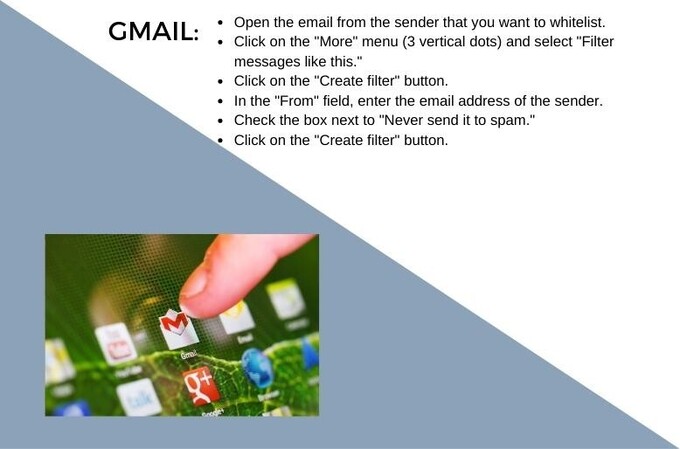
How to Gmail whitelist


For Safari:

  • Open the email from the sender that you want to whitelist.Click on the "Not Junk" button.
A message will appear asking if you want to move the message to your inbox and add the sender to your safe senders list. Click "Move to Inbox."

For Yahoo:

Open the email from the sender that you want to whitelist.

Click on the "Not Spam" button. 

A message will appear asking if you want to move the message to your inbox and add the sender to your contacts. Click "Move to Inbox."

For institutions:

Check with your IT department or email administrator to see if there is a specific process in place for white listing email addresses.

 They may have a system in place for adding specific email addresses or domains to a whitelist.

AI Assistant
Messenger Close

Welcome to the MedsHousing AI Assistant

I'm here to help you search listings by hospital, school, location, or features. I am still in training, so I may occasionally provide incomplete or outdated information.

Please always review the listing and confirm details directly with the landlord.
Listings on MedsHousing.com are the source of truth.

For help, contact info@MedsHousing.com

Microphone Volume