Feel free to ask your question directly to our AI to receive your answer
-
What is your Local Medical School or Hospital?
- Check the various names for the local medical school or hospital nearby with a quick google: 'Medical School or hospital near me'
- Often Medical Schools have the offical name changed after large donations etc. Keep this in mind.
- More recently medical schools send their trainees to remote rural locations or they have several campuses leaners are sent out to for various lengths of time. Ask your local health care connections.
- MedsHousing.com caters to Medical Professional learners, short term locums, contract Medical Professionals and long term permanent placments of Medical Professionals.
- Can't find what school(s) and hospital(s) service your area? Pop us an email and we'll try to find out for you info@MedsHousing.com
- First time landlord for the medical community and wanting to help out with 'Housing for Healthcare'? Send us an email if you are needing some guidance. info@MedsHousing.com
-
What is MedsVerified?
MedsVerified means that person is using their institutional e-mail which verifies their connection to the medical community. Their profile will show a MedsVerified badge, which improves trust between landlords and tenants, without sharing any private account details.
-
What exactly is MedsHousing.com?
MedsHousing.com is a global platform founded by a dedicated team of medical community members who aim to alleviate the housing search stress experienced during medical training and for Medical Professionals seeking accommodations near their workplaces. Our platform also provides an avenue for landlords with properties in proximity to clinics, medical schools, and hospitals to connect with the medical community.
The need for housing solutions for medical students and professionals extends across urban centers, rural communities, and remote locations. We are committed to addressing healthcare shortages by offering 'Housing for Healthcare' in smaller and more remote communities. We actively invite landlords who are interested in contributing to this initiative by providing their homes and rentals in rural and urban areas to join us.
At MedsHousing.com, you can discover listings in major teaching centers worldwide, and our platform continues to expand daily. Whether you're in search of short-term or long-term housing, you can find options that are:
- Located near hospitals and clinics
- Close to medical school campuses
- Ideal for rural placements
- Near satellite medical school campuses
- Available in furnished and unfurnished conditions
- Suitable for away rotations
Explore our platform to find the perfect housing solution tailored to your needs.
-
I haven't received any replies to my listing
There could be a few reasons you have't received a good response.
Check your spam/junk folder:
- Make sure you have added info@MedsHousing.com to your contacts and address book to prevent automatic filing to trash and junk.
- (Google 'how to white list an email address')
Photos and presentation: (ask a friend: would you stay here?)
- Are you in the price range of other properties: too high? Too low?
- Enough short brief points highlighting the home, neighbourhood and commute to medical facilities.
- Do the pictures look inviting and show well?
- Too much clutter? Toilet seat up? Curtains half open, messy.
- Ask a friend to objectively look at your listing. Is it straight to the point? Key features highlighted?
- Often medical trainees book site unseen due to their rigourous schedules.
Poor time of the year:
- there are specific times of the year medical trainees search for housing.
- July generally the start of internship, residency and fellowship (longer term 1-2+ years)
- August Sept new medical students gernerally start their year (Some medical schools have varied intake dates)
- various times of the year medical trainees do short term electives, away rotations, observerships, requiring furnished accommodations away from their home medical schools
- Medical trainees can be sporadic with their commiunication. Often exams, night rotations, on call, application deadlines etc get in ther way of their ability to reach out ansd search. Make it easy for them. Facetime. Skype, Zoom, Teams. (Don't be surprised if you receive followup communication in the middle of the night after radio silence for weeks. They are probably in panic mode, worried they have not secured a place to stay)
-
Are your contact emails going into spam?
Make sure you add info@MedsHousing.com to your contacts or address book. This helps to eliminate losing important messages from prospectivve landlords or tenants. Check your Spam folder every few days. Make sure you do not miss an opportunity.. Many institutional servers have agressive spam filters. (for good reason!)
FAQ for landlords
-
Do I need to use my institution email to register?
It is not imperative to use your medical school or hospital affiliation email, but using it verifies your relationship with the medical community, which helps the landlord confirm you are who you say you are!
-
Is there anything for clinical elective housing?
- MedsHousing.com has multiple listings from independant landlords for short term, long term, furnished and unfurnished
- Medical trainees can post their property (providing permitted by landlord, local authorities, bylaws and condo boards) while doing away rotations or placements.
-
Are properties only available in Canada?
MedsHousing.com is a global listing service that caters to Medical Learners and Medical Professionals worldwide.
If you're leaving for residency and have had an excellent experience with your landlord, we encourage you to share your recommendation. Providing references for incoming medical trainees and Medical Professionals can be invaluable. Having someone who has lived in the same location and can vouch for the landlord offers peace of mind during the housing search process. Your feedback can help create a supportive community within the medical housing network.
-
What to say in my WANT AD
Here are some suggestions to make your ad stand out and receive inquiries.
Title: Medical Professional Seeking Housing
About Me:
- [Your Profession] with [X] years of experience. (Ie: MD, RN, NP, MW) (PGY? M? Year of school, what is the current school? locum, temp, contract etc)
- Quiet, responsible, and clean tenant.
- [Any Specific Preferences or Interests].
Preferences:
- Location: Proximity to [Hospital/Clinic Name].
- Furnished/Unfurnished/doesn't matter
- Amenities: [List Any Specific Amenities].
- Bedrooms: [X] bedrooms required.
- Parking: [Specify Parking Needs].
- Lease Length: [Month-to-month/ X months].
- Shared or Individual: Prefer [Shared/Individual] housing.
Contact:
- [Your Contact Information and best time and method: email, call, text)
Thank you for your consideration!
-
Deposits, Payments & Staying Safe
MedsHousing.com is a housing marketplace that connects members of the medical community with landlords offering short- and long-term rental housing. We do not collect deposits, process payments, or oversee financial transactions.
Because rental laws and practices vary widely by location, it's important that users conduct their own due diligence before sending any money.
-
Does MedsHousing.com collect deposits or rent payments?
No. MedsHousing.com does not collect deposits, rent, or fees on behalf of landlords, and we do not process or verify payments.
All financial arrangements are handled directly between landlords and tenants.
-
Are deposits required when renting through MedsHousing?
Deposit rules vary by country, province/state, and municipality. Some jurisdictions allow deposits, others restrict them, and the rules can differ based on the type and length of rental.
It is the tenant's responsibility to understand and comply with local landlord and tenant laws before sending any money.
-
What should I do before sending a deposit or any payment?
Before sending money, you should always conduct your own due diligence. This may include:
- Verifying the landlord and their right to rent the property
- Reviewing and signing a written lease or rental agreement
- Confirming that the rental terms align with local laws
- Asking questions and requesting references when appropriate
Never send money blindly or under pressure.
-
What if a landlord asks me to send money before I see a lease?
You should pause and seek clarification. In many jurisdictions, tenants are entitled to review a lease or written agreement before making any payment.
If something feels unclear, rushed, or inconsistent, do not proceed until you are comfortable that the arrangement is legitimate and compliant with local laws.
-
What is my local medical school?
A: Identifying the nearest medical school can be challenging, especially in areas with multiple campuses or healthcare partnerships. To simplify your search, consider the following steps:
Consult Your Physician: Your doctor may have insights into local medical schools and training programs.
Contact Local Hospitals: Reach out to the medical education department of nearby hospitals to inquire about affiliated medical schools.
Use Online Search Tools: Perform a Google search for 'medical schools near me' to find nearby institutions.
Explore Local Healthcare Facilities: If you observe medical trainees in local clinics or hospitals, these facilities may be associated with a nearby medical school.
Utilize Google Maps: Enter your property address into Google Maps and search for 'hospitals' or 'medical schools' to identify nearby institutions.
If these steps don't yield the information you need, feel free to contact us at info@medshousing.com with your location and property address. Our team is dedicated to connecting you with the nearest medical educational resources.
FAQ for tenants
-
Landlord User Guide
MEDSHOUSING.COM USER GUIDE
How to Create an Account & Create a Listing
There are 6 steps to creating a rental listing

STEP ONE: REGISTRATION
To create an account, click on
 on the top right corner of the home page and select “Landlord” and enter registration details.
Once you have created your account, you may create your listing.
To do so, on the main page click on

STEP TWO: ADDRESS
Select the package you wish to purchase:
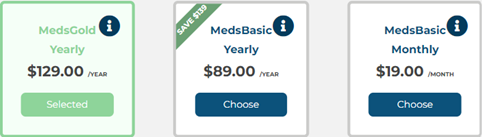
Enter the Listing title and Housing address information and click

STEP THREE: DETAILS
Enter Housing Details, which includes the property type, number of rooms, cost to rent, amenities, which medical school it is located by and a detailed description of your rental property. Adding distances to medical schools, hospitals, clinics and local amenities (grocery shops, cafes, etc) is helpful . These can be found on Google Maps/.
STEP FOUR: PHOTOS
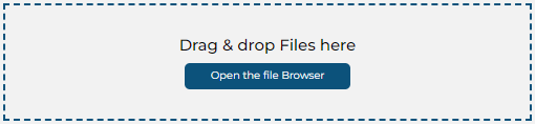
Upload the photos you wish to include in your listing:
Depending on your package, you can post up to 25 photos per listing.
STEP FIVE: AVAILABILITY
Next, confirm the dates your rental property will be available for and the duration.
The calendar is set up to automatically make your property available immediately. If you wish to rent your property on a set day, you will need to block out the days/months prior to the desired date.
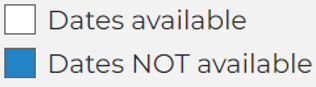
For example, If you wish to rent your property starting July 1st for, you would click on June and block it off as not available (when dates are highlighted blue, it means those dates are not available).
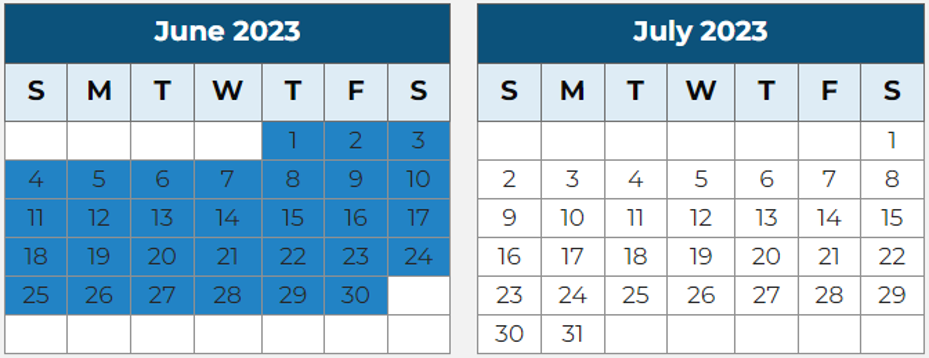
To block out an entire month, click on the name of the month at the top. If you click on a day, it will remove the blue blockout.
When you have selected your desired dates click on
STEP SIX: PAYMENT
Review the details of the package you wish to purchase and click on

You can now enter your payment method details and confirm payment as shown below: This is where you will add a discount code if you have one.
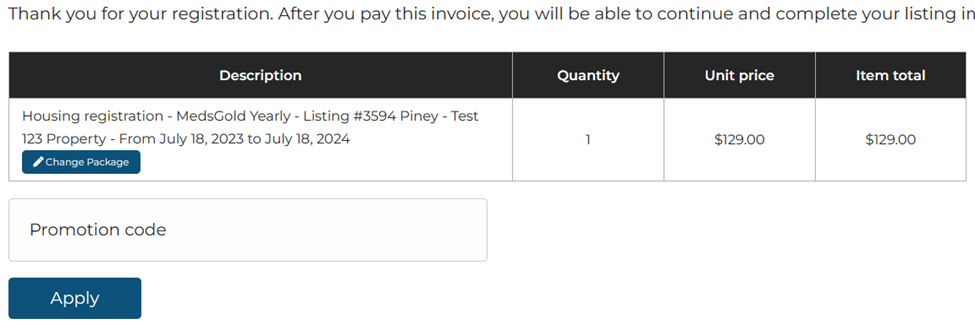
After you pay this invoice, you will be able to continue and complete your listing in the next step.
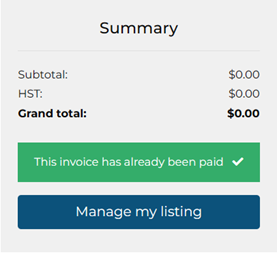
*If you wish to receive notice by text (as well as on the dashboard and by email) you will need to select MedsGold Subscription and tick the box on the description page.
*Remember to check into your dashboard, (pressing save) weekly in order for the site to log when you were last “seen”. This shows tenants you are an active landlord.
RENEWAL
One week prior to the listing expiration date, you will receive a renewal invoice. If you wish to renew, upgrade or downgrade, this is when you would do it. If you no longer wish to continue, the listing will go dormant.
If your property is rented, update the listing by blocking out the dates it is rented for. You have the option to remove the property from view on the description section.
If you wish to completely remove the listing information, delete the listing. If you do not delete , the listing can be reactivated in the future.
Keep in mind, medical learners can often /search or book a few years in advance. Keeping the listing in view allows these future tenants to reach out to you.
-
Q: What is an Ideal MedsHousing property?
Ideal MedsHousing properties are those that cater to the specific needs of medical professionals and trainees. These properties are characterized by their proximity to various essential facilities and features, including:
Medical Schools: The property should be conveniently located near medical schools, allowing easy access for students and trainees.
Hospitals: Close proximity to hospitals is crucial for medical professionals, making it easier for them to commute to work.
Medical Teaching Clinics: Access to medical teaching clinics is essential for hands-on learning experiences for medical students.
Known Rural Satellite Medical School Locations: In addition to urban settings, properties near rural satellite medical school locations are beneficial for those involved in specialized training programs.
Public Transit (if Urban Setting): For properties in urban settings, easy access to public transportation is important, facilitating a convenient commute to medical facilities.
Safe Family Suitable Neighborhoods: The ideal property is situated in a safe and family-friendly neighborhood, ensuring a secure and comfortable living environment.
Near Amenities and Shopping: Proximity to amenities such as fitness gyms, running/biking paths, fresh food markets, and shopping centers enhances the overall quality of life for residents.
Well-Managed and Clean: The property should be well-managed, clean, and well-maintained, creating a comfortable and professional living environment.
Updated and Furnished/Unfurnished: Properties should be updated and can be offered either furnished or unfurnished, accommodating the preferences and needs of medical professionals.
Long-Term and Short-Term Options: Offering both long-term and short-term rental options provides flexibility for medical professionals based on the duration of their training or assignments.
Efficient Transportation to Medical Facilities: Easy access to efficient transportation options to medical facilities ensures that residents can reach their workplace promptly.
Parking Facilities: Adequate parking is considered an asset, providing convenience for residents who own vehicles.
MedsHousing reserves the right to remove any listings that are perceived to be unsuitable for their clients, ensuring that the platform maintains a standard of quality and suitability for medical professionals and trainees.
-
Q: How do I know if there is interest in my listed property?
To gauge interest in your listed property on MedsHousing, follow these steps:
Email Inquiries:
- Monitor your email inbox for direct contacts from potential tenants.
- Be attentive to emails requesting more information about your property.
- Check your junk and spam folders regularly to ensure you don't miss any messages.
- Set your email settings to allow messages from info@MedsHousing.com.
Want Ads for MEDSGold Landlords:
- If you are a MEDSGold landlord, regularly check the Tenant Want ads on MedsHousing.com
- Reach out to potential tenants who have posted ads matching your property.
Text Message Alerts:
- If you are a MEDSGold landlord, opt to receive text message alerts when someone contacts you.
- This provides immediate notification of interest in your property.
Personal Dashboard:
- Log in to your personal dashboard on MedsHousing.
- View and respond to contact messages directly from the dashboard.
- Check for updates, inquiries, and messages related to your listing.
View Statistics:
- Check the bottom of your dashboard to see how many people have viewed your listing.
- Monitor the number of favorites your listing has received, indicating interest.
Social Media Sharing:
- Share your MedsHousing listing on your own social media platforms.
- This can increase visibility and attract potential tenants.
By actively engaging with inquiries through email, text alerts, and your dashboard, as well as utilizing the features available to MEDSGold landlords, you can stay informed about the level of interest in your listed property. Additionally, leveraging social media can help broaden your reach and attract more potential tenants.
-
Q: Are MedsHousing.com tenants verified?
No, MedsHousing.com does not verify tenants. It is the responsibility of landlords to conduct their own due diligence and exercise prudence before engaging in any financial transactions or commitments.
Landlords are advised to:
- Use appropriate leases that adhere to local landlord and tenant laws.
- Utilize all available social media channels to research prospective tenants.
- Conduct virtual or in-person meetings through platforms like Facetime, Skype, Zoom, or telephone before finalizing any agreements.
- Exercise caution and refrain from sending money to overseas accounts as it is a common scam.
- Request identification, photo ID, proof of medical school enrollment, and medical school references to verify the status of potential tenants as medical trainees or healthcare workers.
- Explore the public internet footprint of medical trainees, including checking with student administration, looking for publicly recognized achievements, published articles, and other relevant information.
- Understand that MedsHousing provides a platform for landlords to directly connect with prospective tenants. MedsHousing does not involve itself in the transaction or collect rent.
By following these guidelines, landlords can enhance the security and reliability of their rental arrangements when using MedsHousing.com.
-
Q: I want to rent my property to a medical learner or healthcare provider. Does the property need to be furnished or unfurnished?
Location Matters:
- In major teaching cities near universities, consider long-term rentals (2 to 5+ years) for students.
- Urban centers attract short and long-term healthcare providers based on clinical rotations.
Flexibility:
- Offer the flexibility of furnished or unfurnished options based on tenant needs and preferences.
Smaller or Rural Areas:
- In smaller or rural communities near teaching hospitals:
- Short-term accommodations (2 to 6 weeks) are common for clinical placements.
- Locum replacements for local physicians on vacation and travel healthcare providers may seek furnished properties.
- In smaller or rural communities near teaching hospitals:
Consider Tenant Needs:
- For medical learners during clinical rotations, offering furnished properties is generally preferable.
- Ensure convenience and comfort for healthcare professionals with varying durations of stay.
-
Q: I have an inquiry about my listing in the 'My Listing Inquiries' tab of my Dashboard, but I am unsure how to respond to them.
A: The dashboard functions as a contact log for your listings. When potential tenants are interested, they will reach out to you via email. If you are registered as MedsGold and have opted to receive text messages, you will also receive notifications in that format. It's crucial to keep an eye on your emails and, if applicable, text messages from potential tenants using the contact information you provided when creating your listing.
Please ensure that you have added info@MedsHousing.com to your contact list to avoid missing any important communication. It's important to note that our platform does not have an internal messaging system, so all communication will occur through the provided contact information. If you have any further questions or concerns about responding to inquiries, feel free to reach out to our support team.
-
Q: Should I offer my property to a medical learner for short or long-term?
Long-term Accommodations:
- Needed near home institution
- Duration typically ranges from 2 to 5+ years
- Provides stability for the duration of the training program
Short-term Accommodations:
- Required for elective training in different locations
- Stays can be as short as two weeks to several months
- Funding may be provided by programs for travel and accommodation expenses during electives
Potential Benefits of Offering Both:
- Appeals to medical learners at different stages of their training
- Increases flexibility for tenants with varying housing needs
- Attracts those seeking both stability and temporary housing options
- Maximizes the property's potential for occupancy and income
Considerations:
- Ensure property is located conveniently for both home institution and potential elective placements
- Communicate openly with potential tenants to understand their specific needs
- Verify that the property meets requirements for both short and long-term stays
- Landlords should ensure compliance with local laws regarding short-term rentals
- Verify adherence to condo bylaws and subletting regulations
-
Q: How do I change the rental price for my listing?
FAQ: User
Q: How can I change the rental price for my listing on MedsHousing.com?
A: To update the listing price, log into your dashboard and make the necessary changes in the pricing field. After modifying the price, click on the 'Save' button to ensure the updated information is saved successfully.
-
Q: I have an inquiry about my listing in the 'My Listing Inquiries' tab of my Dashboard, but I am unsure how to respond to them.
Q: How can I access the 'My Listing Inquiries' tab on my Dashboard?
A: To access the 'My Listing Inquiries' tab on your Dashboard, log in to your account and navigate to the main dashboard page. Look for the section or tab labeled 'My Listing Inquiries.' Click on it to view any inquiries related to your listing.
Q: Can I respond to inquiries directly through the 'My Listing Inquiries' tab?
A: No, the 'My Listing Inquiries' tab on the dashboard serves as a contact log, and it does not have a direct messaging system. If tenants are interested, they will contact you via email. Please keep an eye on the email address you provided when creating your listing for potential tenant communications.
Q: What should I do if I receive an inquiry about my listing?
A: When you receive an inquiry about your listing, check your email inbox associated with the account. Potential tenants will contact you via email using the address you provided. Respond promptly to their inquiries and provide the necessary information about the listing. Keep communication clear and friendly to facilitate a positive interaction.
Q: Is there an internal messaging system for communication with potential tenants?
A: No, there is no internal messaging system. Communication with potential tenants occurs through email. Ensure that the email address associated with your account is accurate and regularly monitored to stay informed about inquiries and respond promptly.
-
Q: Is there any way of reporting a no-show so other landlords have a heads up?
A: While we currently do not have a formal reporting system in place, we recommend taking a deposit for any contracts you enter into with tenants, sign a lease, similar to what you would do for any other short or long-term rentals. This helps mitigate the impact of no-shows. Additionally, if the tenants provided references, consider notifying their references about the situation, as it may discourage such behavior in the future.
We understand the importance of sharing information among landlords, and your feedback is valuable to us. Please inform us about the tenant who was a no-show, as this input will assist us in considering a policy for addressing such situations in the future. We appreciate your cooperation in making our community a more reliable and trustworthy place for both tenants and landlords.
-
Q: Can I remove one property listing and replace it with another under the same subscription fee? I have successfully found a tenant and would like to post another property.
A: No, Unfortunately the subscription charges are calculated per listing, and we do not allow substitutions or address changes. However, if you intend to post another property, you qualify for a 50% discount on the second listing of the same kind. Please check your dashboard for further details after logging in.
-
Q:how do I cancel my listing?
A: Cancelling your listing is a straightforward process. You have two options:
Automatic Cancellation:
- One week before your listing expires, you will receive a renewal invoice.
- To cancel the listing, simply refrain from paying this renewal invoice. (BE SURE you did not tick the box for automatic renewals when you first listed the property)
- Your listing will be automatically removed when it expires. (Again, please check your dashboard to be sure you did not ask to have ongoing renewals automatically)
Manual Cancellation:
- Alternatively, you can take a proactive approach and manually cancel the listing:
- Log in to your account and go to the dashboard.
- Locate the listing you want to cancel and remove it from view.
- Within the listing details, find the 'Delete' button and click on it to confirm the cancellation.
- Your listing will be promptly removed from the platform.
- Alternatively, you can take a proactive approach and manually cancel the listing:
Please note that it's important to cancel your listing before the renewal date to avoid any unintentional renewal charges if you have requested automatic renewal when tyo first signed up the listing. . If you encounter any difficulties during this process, don't hesitate to reach out to our customer support for assistance. at info@MedsHousing.com
-
Q: Does MedsHousing collect rent and submit it to the landlord, similar to AirBNB?
A: No. MedsHousing is solely a platform to connect landlords and tenants. We do not participate in any transactions between tenants and landlords. Our role is to facilitate the housing search process by providing a platform for users to find and list properties. Any financial transactions, including rent payments, are exclusively between the tenant and the landlord. MedsHousing does not collect rent or act as an intermediary in the payment process. Users are responsible for managing their own rental agreements and payments directly with the property owner or manager.
-
Q: My listing has been up for one month but I have not received any interest so I posted on a student website and have rented my property. I would like to cancel my listing.
A:
Certainly! The rental landscape for medical students and healthcare providers may differ from the traditional academic calendar. Medical training doesn't adhere to the standard September to April schedule followed by undergraduate students. Our platform primarily caters to mature postgraduate learners in various professions and current healthcare providers.
If your property is specifically tailored for students seeking accommodations within the typical September to April academic cycle, you might find more success on other websites specializing in undergraduate student housing. These platforms are well-suited for the traditional academic calendar.
We recognize the value of such websites and acknowledge their effectiveness in connecting with the undergraduate demographic. However, if your target audience is the mature postgraduate and healthcare provider community, our platform aligns more closely with those preferences.
To cancel your listing, simply refrain from paying the renewal invoice sent out one week before your listing expires. (Please be sure you did not tick the box for automatic renewal. Remove this from the dashboard prior to the end of your listing period if you had selected this option when creating your listing. ) This will ensure a seamless process as you've found a tenant through alternative means. If you have any further questions or require assistance, feel free to reach out to our support team. info@MedsHousing.com
-
Q: How do I change my pictures for an existing posting?
A: To update the photos for your existing listing, please follow these steps carefully:
Access Your Dashboard: Begin by navigating to your main dashboard. Once there, locate and select the listing number (Listing #) you want to edit. You can find this option in the dropdown menu at the top of the page.
Add New Pictures: After selecting your listing, click on the “Add Pictures to my Listing” button. This option is designed to help you update your listing's visual appeal with new photos.
Upload Pictures: To add new images, look for the Browse button situated at the bottom of the page. Click on it and select “Upload one or more file(s) from your computer”. You have the flexibility to either drag and drop the files directly into the designated area or manually browse through your computer to select the photos you wish to upload.
Review and Title Your Images: Once your photos are uploaded, take a moment to review each image. It's important to assign a title to each photo to accurately describe it (for example, 'Bathroom', 'Balcony', etc.). This step helps potential viewers understand what they are looking at.
Managing Photo Limitations: If you've reached the maximum number of photos allowed in your listing, you'll need to remove an existing photo before adding a new one. To delete a photo, click on the trash can icon associated with the image you wish to remove. Be cautious, as clicking the icon will permanently delete the photo without additional confirmation prompts. Ensure it's the correct image you intend to delete.
Finalize Your Upload: After managing your photos, you can proceed to upload new images by repeating the steps above. This ensures your listing is up-to-date with the latest visuals.
Remember, updating your listing with clear and accurate photos can significantly enhance its appeal to potential viewers or buyers. Ensure you follow these steps to keep your listing's visuals fresh and engaging.
-
Q: As a new landlord, can MedsHousing provide me with template rental agreement forms or contracts?
A: While MedsHousing.com focuses on connecting landlords and healthcare professionals seeking housing, we do not directly supply template rental agreements or contracts for landlords.
For comprehensive support and resources tailored to your role as a landlord, including official rental agreement templates, we advise consulting with your local Landlord and Tenant Board or equivalent authority.
These organizations are well-equipped to offer expert advice, up-to-date forms, and guidelines that adhere to your region's housing laws, ensuring you're fully prepared for a successful rental experience.
-
Q: Can I sync my MedsHousing calendar to AirBnB?
A: Yes, you have the option to connect your Airbnb calendar with the MedsHousing calendar.
To sync your MedsHousing calendar with Airbnb, you'll require their authorization.
This integration allows for seamless management of your rental availability across both platforms, ensuring your listing dates are always up-to-date and avoiding double bookings.
-
Q: I'm interested in using your platform to list my properties on your site and would like to know if I need to pay per listing?
A: For property owners looking to list multiple properties on our platform, we offer a special discount to make this process more affordable.
After your first listing, you'll receive a 50% discount on each additional listing, provided they fall within the same subscription category. T
his means that if your first property is listed under any of our subscription plans, such as MedsBasic Monthly, MedsBasic Yearly, or MedsGold, any subsequent properties you list under the same plan will be eligible for this discount.
This offer is designed to support property owners by making it easier and more cost-effective to manage multiple listings.
-
Q: I haven't received any inquiries about my listing. What should I do?
Here are some additional suggestions to boost inquiries for your listing:
Optimize Your Listing: Make sure your listing is well-written, engaging, and highlights the key features of your property. Use high-quality photos to showcase the space attractively.
Update Information: Ensure that all details about your property, such as amenities, location, and nearby attractions, are accurate and up-to-date. This helps potential tenants make informed decisions.
Competitive Pricing: This is KEY> Research similar listings in your area and adjust your pricing accordingly. If your property is priced too high, it may deter potential tenants. Conversely, if it's priced too low, people might question the quality. *Too high rents are the most common reason landlords do not receive any requests. If you have many views and no one has reached out, this might the first thing to look at.
Promote on Multiple Social Media Platforms: Expand your reach by sharing your MedsHousing.com listing of your property on various social media platforms. MedsHousing shares on multiple platforms and proivate groups. Adding your own listing to private social media increases your reach.
Responsive Communication: Be prompt and professional in responding to inquiries. A quick response time can make a significant difference in capturing potential tenants' interest. They likely have reached out to multiple listings. Be the first to respond.!
Special Offers or Discounts for Medical Professionals: Consider offering special 'Medical Professional deals 'or discounts for an initial period to attract attention. This could be a limited-time or for the duration of the lease. Remember, often these professionals may be paying rent at their home school in addition to the short term elective rotations away.
Highlight Unique Features: If your property has unique or standout features, make sure to emphasize them in your listing. This can make your property more appealing compared to others.
Gather and Showcase Positive Reviews: If you have received positive feedback from previous tenants, include one line testimonials or reviews in your listing. Positive experiences can build trust with potential renters. offer 'references on requst from previous tenants'
Refresh Your Listing: Periodically update your listing to keep it current and relevant. This can help it appear in search results and catch the attention of potential tenants who may have missed it before. The platform lists when the landlord was last seen. It demonstrates attentiveness.
Consider Professional Photography: If your current photos are not generating interest, investing in professional photography can significantly improve the visual appeal of your listing. Try Matterport virtual tours. Once you have this you can send to any potential tenants.
By implementing these strategies, you can increase the visibility and attractiveness of your property listing, ultimately leading to more inquiries from potential tenants
-
Q:Do I get a refund for the unused portion of my subscription
Q: Do I get a refund for the unused portion of my subscription if I change my mind, decide to cancel halfway through, or my property rents quickly?
A: No, we do not offer refunds for unused portions of a subscription. We encourage landlords to make the most of their subscription by keeping their calendars up to date. Many medical learners and professionals search for housing up to a year in advance of their placements, so even if your property is currently tenanted, maintaining an updated calendar can help maximize your listing's exposure for future opportunities.Q: How can I prevent auto-renewal of my subscription if I don't want it to continue?
A: You can manage your auto-renewal settings directly from your dashboard. Simply look for the option in red text, and untick the auto-renewal box if you do not wish to continue your subscription. Make sure to check this setting before your subscription ends to avoid automatic renewal.Q: What should I do with my listing if I find a tenant early in my subscription?
A: If you secure a tenant early, you can:- Update the calendar: Mark your property as unavailable during the tenancy, so potential renters see when it will next be available.
- Remove the listing from view: Temporarily hide the listing.
- Delete the listing: If your tenancy is indefinite, you can choose to permanently delete your listing from your dashboard.
Keeping your listing active and calendar updated ensures you maximize the value of your subscription by preparing for future tenants.
-
Q: Why is it important to log in regularly to my MedsHousing account?
Q: Why is it important to log in regularly to my MedsHousing account?
A: The MedsHousing.com platform timestamps the last time a landlord logged in. If it has been more than 90 days since your last login, your listing may appear inactive, which can reduce tenant interest and visibility. Regularly logging in, even to make minor updates, shows you're an active landlord and can significantly improve your listing's opportunities. -
Q: Multiple Unit Listing Rules
? FAQ: Can I list a multi-unit or apartment building on MedsHousing.com?
Q: I have a 10+ unit property (e.g., an apartment building or rental community). Can I list it as one listing on MedsHousing.com?
A: No. MedsHousing.com is designed for individual unit listings, not for advertising entire buildings, REITs, or bulk unit promotions. Each listing on our site must represent a single, specific, available unit.Q: Can I list multiple units from the same property?
A: Yes! You are welcome to list multiple individual units. Each unit must:Have its own separate listing.
Include accurate and up-to-date photos and calendars.
Be available exactly as advertised—no bait-and-switch listings allowed.
Q: Is there a discount if I want to list multiple units?
A: Yes. After your first unit is listed at the regular rate, all subsequent listings of the same membership level (e.g., MedsBasic or MedsGold) are available at 50% off.Q: Why does MedsHousing not allow full-building listings?
A: MedsHousing is a curated platform focused on housing for medical learners. Our mission is to keep the site community-oriented, transparent, and easy to navigate for students and professionals seeking short- or mid-term accommodations. We avoid “listing clutter” by discouraging bulk advertisements of large developments or buildings.Q: What if I want to promote a new development (e.g., a 50-unit luxury rental)?
A: While we don't allow mass listings for entire buildings, you're welcome to feature individual units from your development that are move-in ready and priced accordingly. Each must be listed separately and meet our posting standards.Still have questions?
Email us at info@medshousing.com and we'd be happy to help! -
Q: Why can I not contact a Want Ad?
To contact a Want Ad, you need to be a landlord that has a MedsGold account. Only MedsGold members can contact Want Ads.
-
I am too busy to keep checking the listings. What can I do.
We understand it's a hectic time with applications, exams, clinicals, and trying to maintain a personal life.
Solution: Place a 'MEDS Want Ad' and let landlords find you! Let them know where the demand is too!
Landlords with a paid Meds GOLD subscription can access the 'Tenant want ADS' section (upper right tab) and send messages directly to you. Ensure that you have info@MedsHousing.com added to your contact list to avoid losing any messages sent to your email!
-
Are the landlords verified?
-
I have a great landlord, can I refer them to MedsHousing?
Absolutely! We love it when medical trainees recommend landlords and properties to MedsHousing.com. If you have a fantastic landlord and are moving onto the next stage, share the love by sending them to our site.
Encourage your landlord to visit MedsHousing.com and make sure to let them know why you think their property would make a great MedsHousing home! If you email info@MedsHousing.com with their contact information, we can offer them a discount promo code to try out MedsHousing.com.
Don't forget to inform your landlord about which medical school to link to. Not everyone is aware of the medical school serving their community, especially if it's a secondary or rural campus.
Great MedsHousing.com properties MAY have some or all of the following features:
- Super attentive landlord
- Lots of medical learners or medical professionals in the neighborhood
- Proximity to training facilities such as Medical School or Hospital
- Close to amenities with no need for a car
- Safe for running, cycling, and enjoying off-call moments
- Fitness facilities
- Easy access to public transit for hospitals and/or medical school
- Safe and convenient living environment
- Clean and well-equipped spaces
- Great value for the rental
- Rural community setting relatively close to the hospital
Help us build a community of quality MedsHousing Landlords by spreading the word and bringing in more wonderful landlords to our platform! FYI We REALLY love to find new rural landlords!
-
Do I need a separate account to post my own place while I do away rotations?
Yes, currently, you will need to create two separate accounts using two distinct email addresses to facilitate the process of posting your own place during away rotations:
TENANT Account:
- Use this account to post a housing Meds Want Ad.
- Enables you to contact landlords regarding available listings.
LANDLORD Account:
- Use a different email address from the one registered for your Tenant account.
- Utilize this account to list your own property for potential tenants.
The dual-account system helps streamline the process and ensures clear communication between tenants and landlords. If you're away on electives and have a place to share, creating a LANDLORD account allows you to contribute to the community by providing a suitable spot for fellow medical learners or professionals. This setup ensures that both parties have the necessary functionalities for their respective needs within the platform.
-
What if I'm asked to send a deposit to a different email or account?
Requests to send money to a different email address or account than previously used should be approached with caution.
Pause the transaction and verify the request directly with the landlord before sending any funds. If anything feels off, it's safest not to proceed until the situation is clearly resolved.
-
Does MedsHousing verify landlords or payment requests?
No. MedsHousing.com does not verify landlord identities, ownership documents, payment instructions, or financial transactions.
Users are responsible for confirming that a landlord and rental arrangement are legitimate before entering into an agreement or sending money.
-
What should I do if something doesn't feel right?
Trust your instincts. If something feels unclear, inconsistent, or uncomfortable:
- Pause the transaction
- Ask questions
- Seek clarification
- Do not send money until you are confident all details are legitimate
Taking extra time to verify details can help prevent issues.
-
Can I report a concern to MedsHousing?
Yes. While MedsHousing does not oversee transactions, we encourage users to report concerns so we can monitor platform activity and improve awareness for the medical community.
A final note
MedsHousing.com is designed to help connect the medical community with housing opportunities — not to replace local laws, legal advice, or personal due diligence. Every community is different, and users should always take appropriate steps to protect themselves when entering into a rental agreement.